Printed Cinema Programmes or Lobby Displays: Which Helps Visitors Find Their Way?
Printed cinema programmes or lobby displays can help visitors browse screenings or follow changes on site; choose the format that suits each task.
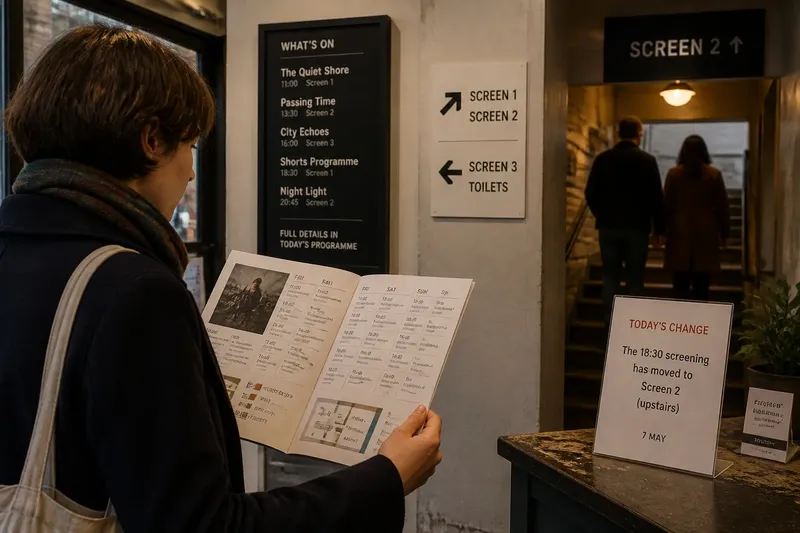
The common mistake with printed cinema programmes and lobby displays is asking either one to do both jobs: explain the whole programme and direct someone through the building. That can leave visitors scanning a long listing when they need a room, or searching for a display when they want to compare films. Give each format a clear purpose, and the visit becomes easier to plan and follow.
A programme is portable and suited to browsing; a lobby display is tied to a place and can focus on what is happening there. Their overlap should be limited to essential details visitors need to match, such as a film title, start time and room name.
What belongs in a printed cinema programme?
A printed cinema programme is most useful when visitors need context or want to compare screenings. It can bring together titles, times, short descriptions, event notes and access information in one object that can be read before arrival or carried around the cinema.
Because a programme is prepared in advance, it may not reflect a late change to a screening or room. Make its issue period easy to see, and treat it as a guide to the planned schedule rather than the sole source for urgent updates. A current notice on site can address changes without making every copy obsolete.
Organise the listings so readers can scan them: group screenings by day or time, use consistent title wording, and include a simple map if the building is difficult to navigate. A map should identify landmarks visitors can recognise, such as the ticket desk, stairs and auditorium doors.
Choose paper when visitors need to browse several options or take fuller information with them.
What should a lobby display do?
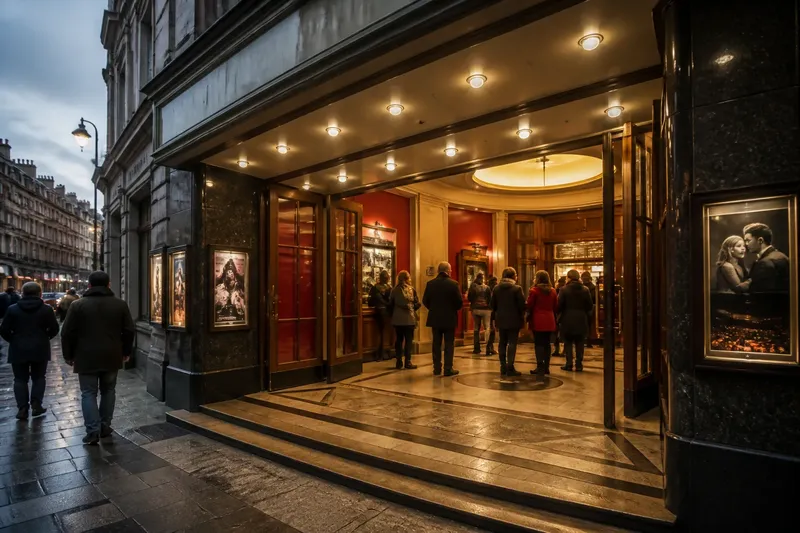
A lobby display should answer a question that arises at its location. Near the entrance, it can show what is on and where to go next. At a corridor junction, it can point towards a named auditorium. Beside a door, it can confirm the screening and any immediate event instruction.
Digital screens can be revised when details change, but a rotating sequence may make visitors wait for the relevant message. A static board remains visible, although someone must remove outdated notices. Choose the format according to how often the information changes and who is responsible for keeping it current.
Keep each display focused. A junction sign needs a direction and a recognisable destination, not the full programme, house rules and promotional copy in one crowded panel. Place it where people can stop to read without blocking a doorway or queue.
How can the programme and signs use consistent room names?
Visitors can struggle even when every piece of information is technically correct. A programme might call a room “Studio” while the door says “Screen 3”; the visitor then has to work out whether the names refer to the same place. Use the name printed on the destination door throughout the programme and directional signs, unless the cinema has a clear reason to use another shared label.
Imagine a small cinema whose programme lists a film in “Studio”, while the corridor door reads “Screen 3”. The cinema changes the programme and junction sign to “Screen 3”. The expected result is that visitors can match the listing to the door without asking staff to interpret the two names.
Check the route from the entrance rather than judging signs from behind the desk. If visitors stop or turn back at a junction, the useful fix may be a marker at that turn, not more wording on the entrance board.
What should a cinema do when the schedule changes?
Keep planned information in the printed programme and put current changes where arriving visitors will see them. If a room assignment changes, post a dated notice at the entrance and at any later junction where visitors must choose a direction. State the change plainly, then remove the notice when it no longer applies.
For example, a programme lists a screening in the downstairs auditorium, but the cinema moves it upstairs on the day. A notice at the entrance and the stairs says, “Today’s screening is in the upstairs auditorium.” Visitors following the route can see the updated destination before reaching the old room.
For changes affecting people already inside, place information along their route as well. Staff should use the same room name and wording as the notices. Follow the cinema’s operating instructions and consult the responsible professional where local access requirements need specific interpretation.
How should a cinema divide information between paper and displays?
Use each medium for the moment it serves best. The programme can support browsing and provide fuller context; displays can confirm current details and guide movement through the building. Repeat information only when visitors need it to connect one point to another.
- Check whether visitors need to compare several screenings; if they do, include the listings and brief descriptions in the programme, otherwise keep the paper focused on essential visit information.
- Check whether a detail can change after printing; if it can, put the current version on a dated on-site notice, otherwise keep it in the programme.
- Check whether visitors can see the next destination from the entrance; if they cannot, add a directional sign at the first junction, otherwise avoid adding a redundant arrow.
- Check whether the room name on the programme matches the door; if it does not, change the listing or door label to the cinema’s shared name, otherwise leave the labels as they are.
- Check whether a digital screen hides information between slides; if it does, keep essential directions continuously visible or use a static sign, otherwise use the screen for changing updates.
- Check whether a notice still applies; if it does, keep it visible along the affected route, otherwise remove it so visitors do not follow stale instructions.
Say a cinema has a printed listing for a discussion screening in “Screen 2”, an entrance board that only shows film titles, and a corridor fork without a direction sign. Visitors ask staff which room hosts the discussion. The cinema keeps the fuller event description in the programme, adds “Screen 2” beside the title on the entrance board, and places an arrow to Screen 2 at the fork. The resulting arrangement preserves the programme’s context while giving visitors the missing direction at the point where they need to choose.
Which format suits a cinema’s visit?
The choice depends on the building and on what visitors need to do. A programme is useful for a varied season that people may want to browse or plan around. On-site displays matter when rooms are hard to find or details can change after the paper is printed. Many cinemas can use both, provided each has a distinct job.
Before adding material, identify the moment it serves: choosing a film, finding the room or responding to a change. Put the information in the format and place that can answer that question. For printed cinema programmes or lobby displays, the best choice is often a division of duties rather than a single winner.
What do visitors ask about cinema programmes and displays?
Should every screening appear in the printed programme?
Include screenings visitors need to compare or plan around, and make the programme’s issue period clear. Put late changes on site so arriving visitors can see the current information.
Where should the main lobby display go?
Place it near the entrance or ticket point if visitors need to choose a screening or route there. Add directional signs at later junctions when the auditorium is not visible from that point.
Are digital lobby screens better than printed boards?
Digital screens suit information that changes, while static boards keep essential messages visible without cycling. Choose based on who can update the display and whether visitors can read the message when they need it.
Which details should appear in both formats?
Repeat details visitors must match, especially the film title, start time and room name. Let the programme give fuller context and the display answer the immediate question.
How can a cinema tell if its information is clear?
Notice where visitors pause, turn back or ask the same direction question. Each pattern points to a different possible fix: align a room name, move a display, add a marker at a junction or simplify a listing. Change the part linked to the confusion rather than adding more material everywhere.
Printed cinema programmes and lobby displays work best when each answers a different need. Let the programme help visitors browse and carry context; let signs confirm current details and direct the next movement. Keep the room name consistent from listing to door, so the visitor can recognise the destination without translating the cinema’s terminology.